



Are you wondering if Xero is the right accounting software for your business? This Xero Review breaks down everything you need to know.
If you run a business, you already know this: Keeping up with money can feel stressful. Invoices, receipts, bills, tax deadlines, and tracking what you actually made can quickly become a mess. That’s where accounting software like Xero can help.
Instead of juggling spreadsheets and guessing at your numbers, Xero puts the finances of your small business in one place. You can send invoices, connect your bank, track expenses, run reports, and see your cash flow faster. For many freelancers and small business owners, this saves time, lowers stress, and helps you make better money decisions.
Xero Review
In this Xero review, I’ll talk about what Xero does, who it’s best for, pricing, pros and cons, and common questions. My goal is to help you decide if Xero is the right fit for your business.
What is Xero?
Xero is cloud-based accounting software for small businesses. “Cloud-based” just means you can log in online from anywhere (such as your phone or laptop) that you have internet, instead of installing software on just one computer.
With Xero, you can:
- Send invoices and quotes
- Accept online payments
- Connect your bank account
- Reconcile transactions
- Track bills and expenses
- Run reports (like profit and loss)
- Use a mobile app on the go
- Connect other tools and apps, like Gusto for payroll
Xero is built to help you stay organized and see where your money is going.
You can try Xero for free by clicking here.
Why use accounting software like Xero?
A lot of people start out tracking money in a spreadsheet, and that can work for a little while. But as your business grows, it gets harder and takes more time.
Here’s why many people switch to software like Xero:
- It saves time: less manual data entry
- It helps reduce mistakes: fewer missed transactions
- It keeps records organized: helpful at tax time
- It gives you real numbers: so you can make smarter decisions
- It helps you get paid faster: through invoicing and online payments
- It makes working with an accountant easier: everything is in one place
If you feel behind on bookkeeping or don’t know your numbers, this kind of tool can make a big difference.
Who Xero is best for
Xero can be a good fit if you are:
- A freelancer or solopreneur
- A service business owner
- A small business with a team
- Someone who wants cleaner books and easier tax prep
- Someone who works with a bookkeeper or accountant
Xero may not be the best fit if you only need very basic invoicing and nothing else. In that case, a simpler tool might be enough.
Xero Features
Here are some of the main features and what they mean for your day-to-day life.
1. Invoicing and getting paid
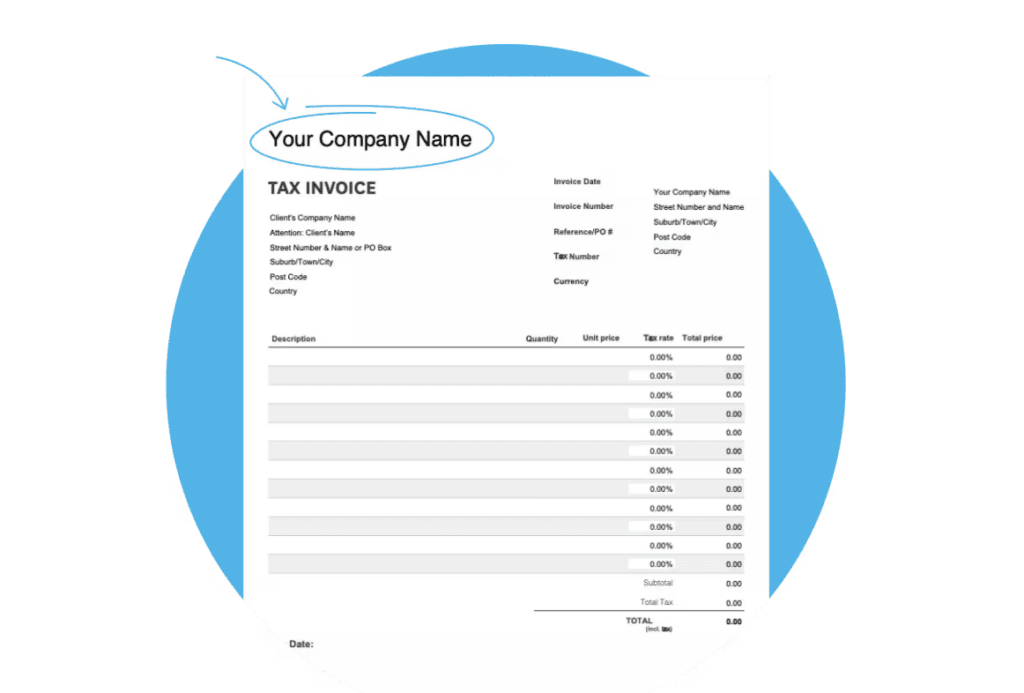
If you run a business, getting paid on time matters a lot. This is one area where Xero can really help.
With Xero, you can create and send invoices, see when they’re opened, and make it easier for customers to pay online. You can also send quotes and turn approved quotes into invoices, which saves time and keeps things organized.
2. Bank connections and reconciliation
This is one of the biggest reasons people switch to accounting software.
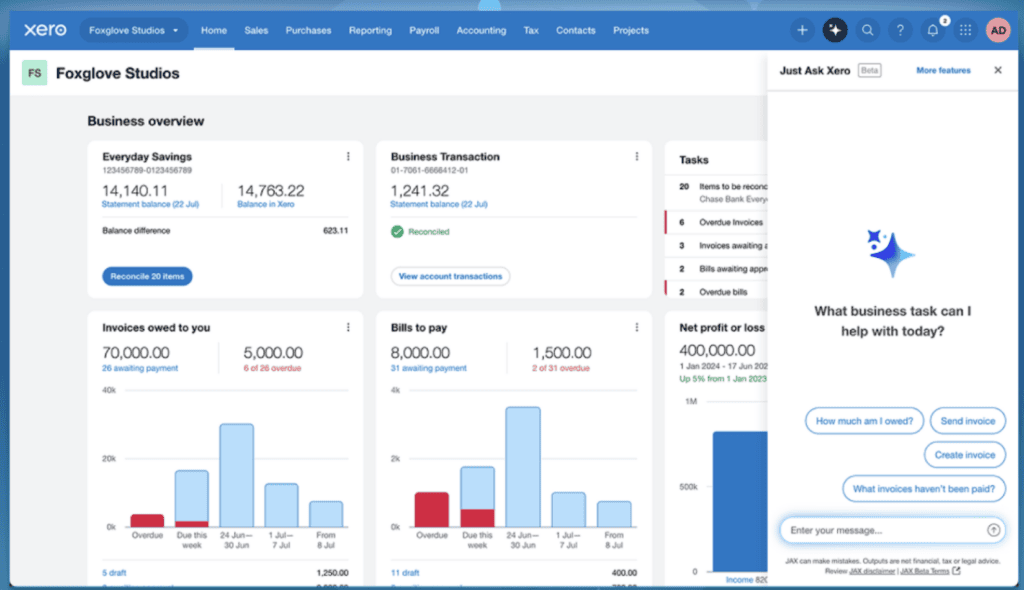
With Xero, you can connect your business bank account so transactions flow into your account automatically. That means you don’t have to manually type in every purchase and deposit, which saves a lot of time and helps cut down on mistakes.
Then comes reconciliation, which is just a simple way of saying: Match what happened in your bank account to what’s in your bookkeeping records. When this is done regularly, your books stay clean and accurate. You can see what’s been matched, what still needs review, and where something may be off.
3. Bills and expenses
This is one of the most helpful parts of Xero, especially if you’re tired of digging through emails and receipts every month.
With Xero, you can track your business expenses and organize bills in one place so you know exactly what’s coming in and going out. Instead of trying to remember due dates or manually typing everything into a spreadsheet, you can keep your records updated as you go.
Another big benefit is tax-time prep. When expenses are categorized throughout the year, you’re not scrambling later trying to sort everything. Your records are cleaner, and it’s much easier to hand things over to your bookkeeper or accountant.
4. Reports and dashboard
Xero has a dashboard and financial reports so you can quickly see how your business is doing. This is useful if you want to track profit, cash flow, and trends.
You can make financial statements like:
- Balance sheet
- Income statement
- Cash flow statement
5. Mobile app
If you’re busy and away from your desk a lot, the mobile app is really helpful.
Xero’s phone app lets you handle things from your phone, like sending invoices, checking unpaid bills, reviewing transactions, and seeing your numbers. So if you’re traveling, running errands, or between meetings, you can still stay on top of your business without opening your laptop.
6. Payroll option (available across regions, including the US, UK, and AU)
If you have employees (or plan to hire), payroll is one of those tasks that can eat up a lot of time.
In the United States, Xero handles payroll through a Gusto integration, and this is a useful setup for small business owners who want payroll and bookkeeping to work together.
Xero Pricing Plans
Xero has three main plans for U.S. small business owners: Early, Growing, and Established.
Without any discounts or promotions, Xero’s pricing is around $25 to $90 per month, depending on the plan you choose. Since prices can change over time, I recommend double-checking Xero’s pricing page before signing up so you’re seeing the most current rates.
Which Xero plan is best for you?
- Early plan is best if you’re brand new, have simple books, and send only a small number of invoices/quotes each month. It’s the most affordable option, and it gives you core accounting features, but it has tighter limits and fewer advanced tools.
- Growing plan is a great fit for many freelancers and small business owners who have more day-to-day accounting activity. You can send unlimited invoices and use more automation/reporting features, which can save a lot of time once your business gets busier.
- Established plan is best for businesses that want advanced features like more reporting and tools for more complex operations. If you need things like multi-currency, project tracking, and better analytics, this is usually the right tier.
If you’re unsure, start with the lowest plan that covers your current needs, then upgrade as your business grows. That way, you’re not overpaying early on, but you still have room to scale when you need more features.
Xero Pros and Cons
No software is perfect, so here’s my honest, quick list.
What I like about Xero:
- Easy way to keep finances in one place
- Strong invoicing and day-to-day bookkeeping tools
- Helpful bank connection and reconciliation features
- Clear reports and dashboard for better decisions
- Good for working with an accountant/bookkeeper
- Phone access and app integrations
- You can have unlimited users for no extra cost
The cons of Xero:
- New users may need a little setup time at first
- If you only need simple invoicing, it might feel like more than you need
Xero vs. “doing it yourself” in spreadsheets
A spreadsheet can work when you’re brand new. But once you have a lot of transactions, it gets harder to stay accurate and organized.
Xero usually wins on:
- Automation
- Accuracy
- Speed
- Visibility (being able to easily see different reports)
If your business finances feel messy, switching from spreadsheets to accounting software is usually worth it.
Xero vs. FreshBooks
If you’re trying to decide between Xero and FreshBooks, both are good options if you’re looking for the best accounting software, but they can be best for different people.
Xero is usually better for small business owners who want a full accounting system with room to grow. It has bank reconciliation, detailed reporting, inventory options, and lots of app integrations (like for payroll). If you plan to grow a lot, hire help, or want more financial reports, Xero may be the better option.
FreshBooks is usually better for freelancers and service-based business owners who want something easy and fast for invoicing and basic expense tracking. It’s very user-friendly and can feel less overwhelming when you’re just starting out.
Also, if you look at what you get for the price, Xero stands out for small business owners who want more than basic invoicing. While FreshBooks may have a slightly lower monthly cost, Xero gives you more of a full-accounting setup with better bookkeeping workflows, reconciliation, reporting, and room to grow as your business gets more complex. That means you’re less likely to outgrow it and switch systems later. So even if Xero costs a little more, it can be the better long-term value if you want an accounting platform that can scale with your business.
Quick breakdown:
- Choose Xero if: you want more accounting features, stronger reporting, and room to grow.
- Choose FreshBooks if: you want an easy invoicing-focused tool and an easy tool to use.
- Best for growing businesses: Xero
- Best for very simple solo businesses: FreshBooks
How To Get Started With Xero
If you decide to try Xero, here’s what you can do:
- Pick a plan (or free offer, if available)
- Set up your business profile through the Xero dashboard
- Connect your bank account
- Create your invoice template
- Start tracking bills and expenses
- Reconcile transactions each week
- Run monthly reports
- Invite your accountant/bookkeeper (optional)
This gives you a clean system and helps prevent last-minute stress at tax time.
Frequently Asked Questions About Xero
Below are answers to questions you may have about Xero.
Can I try Xero out for free?
Yes, Xero has a free trial offer right now for one month free. You could even make a demo company with the free trial to see if you like it first. Here’s what Xero says: “Purchase any Xero plan and your first month will be free. Your free month begins once you finalize your business and set up in Xero. You will receive a reminder 7 days before your free month ends, and then you will be charged for your second month and onwards. Xero subscriptions auto-renew monthly until they are cancelled.”
Is Xero good for small businesses?
Yes. Xero is made for small businesses and includes tools for invoicing, tracking expenses, and running reports.
Is Xero beginner-friendly?
For most people, yes, Xero is good for beginners. There is some setup at the start, but once it’s set up, it’s fairly easy to use each day.
Can Xero replace an accountant?
Not fully. Xero helps with bookkeeping and organization, but many people still use an accountant for tax strategy and advice.
Can I connect my bank account to Xero?
Yes. Bank connection and reconciliation are core parts of how Xero works.
Does Xero have a mobile app?
Yes, Xero has a mobile app so you can manage tasks, like sending invoices or reading financial reports, when you’re away from your computer.
Can I use Xero when I don’t have internet?
Xero can be used when you have an internet connection or cell phone wifi. So, no, it does not work when you don’t have internet.
Can I send invoices through Xero?
Yes, invoicing is one of Xero’s main features, and you can also receive online payments with Xero.
Does Xero include payroll in the US?
Xero supports payroll in the United States through Gusto integration.
Is Xero safe to use?
Yes, Xero is safe to use. Of course, it’s always a good idea to use strong passwords and multi-factor authentication as well.
Xero Review: Is Xero Worth It?
I hope you enjoyed my Xero review.
If you’re a freelancer or small business owner who wants to save time, stay organized, and understand your numbers better, Xero can absolutely be worth it.
I like that it helps with the things that actually matter in real life: getting paid, tracking expenses, and keeping your books clean. It’s also useful if you want to grow your business and stop guessing about your money.
If you’re still doing everything manually and feeling behind, moving to software like Xero can be a smart step.
You can try Xero for free by clicking here.
What do you use for accounting, invoices, and more for your business?
Recommended reading:
Leave a Reply