


The following is a sponsored partnership with Kudos.
Have you heard about Kudos – the free AI-powered wallet that helps you get more out of your wallet? In this Kudos Review, I’ll explain how this desktop browser extension and app helps you earn the maximum rewards and benefits when shopping online. With the average Kudos member earning $750 per year, you won’t want to miss out on this game-changing tool!
With the Kudos extension, you can always choose the best card for maximum rewards at checkout, easily autofill your card information (including CCV) with just one click, find new cards that match your shopping preferences, and more.
Plus, Kudos has helped its members earn $150 million in rewards and counting!
The best part? Kudos has a free plan you can start with right away, and they also have a Premium plan with extra features (like bill negotiation and subscription cancellation).
If you don’t want to leave money on the table, there’s no reason not to use Kudos to take the guesswork out of deciding which credit card to use for each online purchase.
Personally, I find Kudos incredibly helpful. As someone with multiple rewards credit cards, each with their own unique benefits, Kudos saves me a ton of time by instantly identifying the best card to use for each transaction. This not only simplifies my life but also helps me earn more money!
This is great so that you are using the full potential of your credit cards.
You can download Kudos for free by clicking here.
Key Takeaways from this Kudos Review
- Kudos is a free AI-powered wallet that maximizes your credit card rewards when you shop online, whether you’re buying groceries, clothing, travel packages, furniture, or anything else—all with a single click.
- With Kudos, you no longer have to guess which credit card to use for each purchase. Just shop like normal and Kudos will automatically recommend the best card to make sure you always earn the highest cashback, points, or miles on every transaction.
- Kudos supports over 2 million stores, so you’re virtually guaranteed to find your favorite retailers and maximize your rewards with them.
- Even if your credit card doesn’t typically offer rewards, you can still earn rewards by shopping through the Kudos browser extension at participating merchants.
- Kudos is compatible with all major desktop browsers (Chrome, Safari, Edge) and is also available as an iPhone app, making it easy to boost your credit card rewards across every device.
Kudos Review
Below is my Kudos review.
What is Kudos?
Kudos (also known as Kudos Technologies, Inc.) is a helpful AI-powered browser extension and app designed to help you make the most of your credit cards, particularly when shopping online. It was founded by Tikue Anazodo and Ahmad Ismail, and Kudos has been featured on Forbes, Yahoo Finance, Bloomberg, The Motley Fool, Nasdaq, and more.
Think of it as a smart wallet for your browser. Driven by the complex world of credit card rewards, the Kudos team created this tool to simplify the process.
Here’s how it shines: Select the cards you commonly use (without the need for any sensitive bank details) and Kudos tells you which one to use at checkout. You see, your cards might be packed with potential rewards for different spending categories—travel, groceries, or dining.
Different credit cards have so many different benefits (such as the rewards percentage, extended warranties, purchase protection, insurance, and more), which can be difficult to keep track of.
Kudos makes sure you’re using the best card possible to earn the most rewards, which is especially useful if you have more than one rewards credit card.
Members have collectively earned over $150 million in rewards with Kudos. On a personal level, you could boost your annual shopping rewards by an average of $750 just by using Kudos.
Plus, Kudos is super user-friendly. You can add it to your preferred desktop browser (Chrome, Safari, Edge) or use it on your iPhone, and it’s completely free. The service makes money by earning a small commission when you shop at participating stores or sign up for a card through their recommendations.
When you shop without Kudos, you could be missing out on opportunities to earn rewards with your purchases. Why miss out on potential earnings when Kudos provides a free and simple solution?
Kudos also has a really helpful Instagram account full of helpful credit card tips. I highly recommend checking that out here.
How Kudos works
Imagine you’re online shopping, ready to checkout, and you pause, thinking, which credit card do I use? That’s where Kudos steps in, always there to give you the best advice.
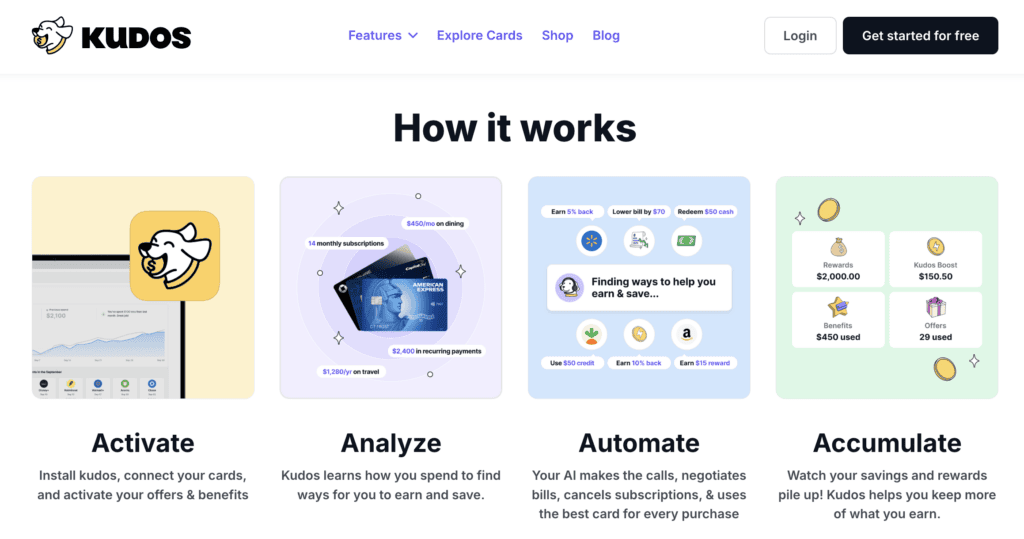
Kudos knows your cards and suggests which one to use at checkout. But how? First, you add your credit cards to the Kudos wallet. It’s safe and simple. When it’s time to buy something, Kudos pops up and says, “Hey, use this card!” Why? Because it’s the card that will give you the most rewards or savings for that purchase.
Here are the steps to get started:
- Download the Kudos browser extension (takes less than a minute to do) on your desktop browser (Chrome, Safari, Edge) or iPhone. You’ll also answer basic questions like your name and the type of credit card you have (such as the Chase Freedom card).
- Shop like you normally do.
- Once you’re ready to checkout, Kudos will automatically appear to let you know which credit card you should use to get the most rewards and benefits.
- Click the card you want to use and Kudos will then autofill the card info, making checkout a breeze.
What stores does Kudos work on?
Kudos works at over 2 million online stores and with over 3,000 credit cards – so there’s a very good chance that it’ll work for you.
Don’t see a store supported or can’t find your card? Their support team is super responsive and will help you out!
Kudos vs. other rewards tools: What sets Kudos apart?
When it comes to maximizing credit card rewards, Kudos stands out from other popular tools like Rakuten, Honey, and Capital One Shopping.
While these platforms primarily focus on providing cashback offers or coupon codes, Kudos takes a more comprehensive approach to optimize your entire credit card strategy.
What sets Kudos apart is its AI-powered technology that analyzes your specific credit cards and spending habits to recommend the best card for each purchase.
This makes sure that you’re not only earning cashback but also maximizing your points, miles, and other card-specific perks. By considering factors like bonus categories, statement credits, and exclusive benefits, Kudos helps you get the most value out of your credit cards.
Main Features of Kudos
When shopping online, you want to stretch your dollar as far as it can go. Kudos has features that make this easy by helping you get the most out of your credit cards such as:
Maximize your credit card rewards
When you’re shopping online, Kudos helps you pick the best card to use to maximize your rewards and benefits.
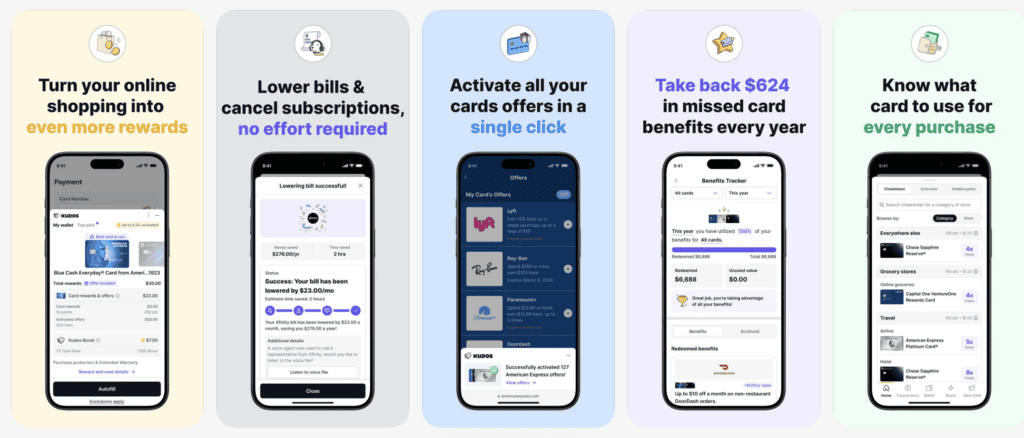
With Kudos, you no longer have to guess which credit card to use. This AI-powered wallet automatically recommends the best card for each purchase, making sure you always receive the highest cashback, points, or miles possible.
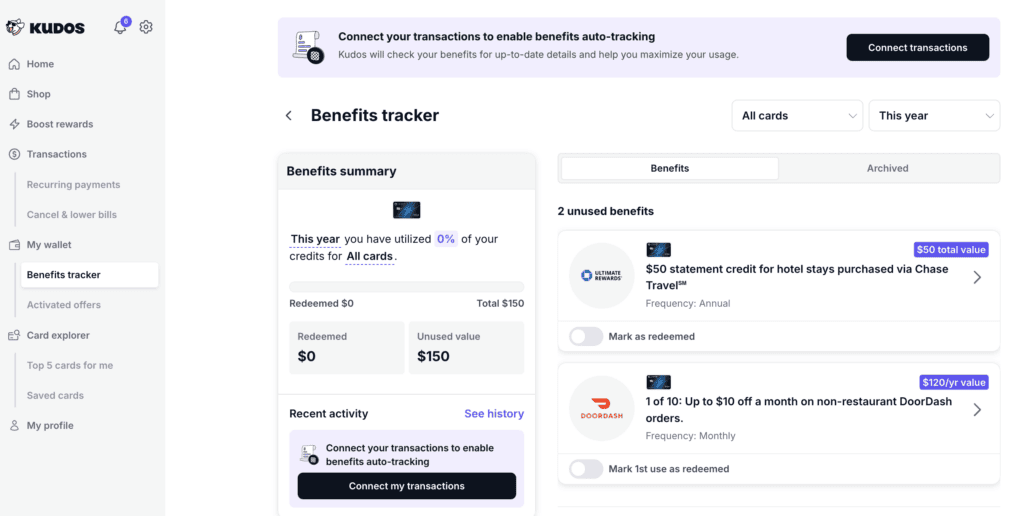
I personally didn’t even know that one of my credit cards had some of the benefits that Kudos listed, and I can’t believe I had been wasting so much money by skipping out on such a valuable benefit! Kudos makes it very easy for me to see my card’s benefits all in one easy place.
Plus, if you’d like, you can add your credit card information to Kudos, and Kudos will autofill your card info (including CCV) to make checking out fast.
Another way that Kudos helps you earn more rewards is because Kudos helps you build your Dream Wallet so you can get the most out of your everyday purchases. You’ll go through a quick quiz to help Kudos gather information about your needs.
Get cash back
With Kudos, you can get cashback from around 15,000 different stores. And, Kudos passes you 100% of the commissions they earn from merchants that you shop at back to you as cashback.
Kudos can negotiate your bills for you
One of the newest features in Kudos (on the Kudos Premium plan) is something I think a lot of people will love: AI bill negotiation.
This is for people who want to lower monthly bills (like phone or internet), but don’t want to spend time on hold or go back and forth with customer service. With this feature, you tap a button in Kudos, and their AI handles the call and negotiation for you.
Here’s the big thing: you keep 100% of the savings. Some other bill negotiation services take a percentage of what they save you, but Kudos doesn’t take a cut.
If the AI can’t find a discount (if you already have the best rate), then at least you know you’re already in a good spot – and you can always try again later.
Here’s how the AI bill negotiation works:
- Pick the bill you want to try to lower inside Kudos (when you’re logged into Kudos).
- Tap “Lower my bill.”
- The AI handles the call and negotiations. If anything needs your approval (like a verification step), you simply give them the code.
This process takes around 10 minutes, which is a lot faster than doing it yourself.
Subscription cancellation
Kudos also has a subscription cancellation feature.
It can detect recurring charges, and then you can choose which subscriptions you want to cancel. After you pick one, Kudos helps handle the cancellation steps so you don’t have to dig through hidden menus or waste time figuring out where the cancel button is.
This can be an easy way to save money, especially if you’re paying for subscriptions you forgot about or no longer use.
Receive personalized credit card recommendations
Stop wasting time opening up credit card application pages on incognito. You can receive access to elevated card offers on Kudos’ Explore Tool through their partnership with The Points Guy.
So, if you are looking for a new credit card, use Kudos to help filter the best one for you and your situation and compare different cards in one easy place.
For example, Kudos member Christina L. was able to get 150,000 Membership Rewards points after spending $6,000 on the Amex Platinum card within the first three months of account opening. That’s almost double the 80,000 points after spending $8,000 found on the American Express website!
Card-linked offers
One of the most popular features Kudos has recently launched is automatic activation of card-linked offers.
This is where Kudos automatically activates card offers across top issuers so users can earn additional rewards on top of their credit card rewards at many merchants.
Answer all your credit card questions with MariaGPT
Maria GPT is an AI-powered, personalized assistant designed to answer all your credit card questions, available on the Kudos mobile app.
She can help you understand the benefits of your current cards and offer personalized suggestions for new cards based on your spending habits, goals, and objectives.
Frequently Asked Questions about Kudos Review
Below are common questions about Kudos, the free AI-powered wallet.
Is Kudos free to use?
Kudos is free to use.
How does Kudos make money?
Kudos’ free plan is free because they earn commissions from card issuers when you apply for cards. Kudos also has a premium plan which has more features and has a monthly fee.
Is there a Kudos referral code?
Yes! Sign-up for Kudos for free and use the Kudos referral code “CENTS.”
How much can you earn with Kudos?
On average, Kudos members earn $750 per year in rewards by using the app to maximize their earnings.
Do I need to provide my credit card numbers to use Kudos?
No, you don’t need to enter your credit card numbers to use Kudos. Simply select the cards you have in your wallet, and Kudos will help you maximize your benefits at checkout. Providing your credit card information is optional if you want to speed up the checkout process.
Can I use Kudos with other browser extensions?
If you use Kudos Boost and then activate another rewards program like Rakuten, Honey, Capital One Shopping, or others during the same shopping session, Kudos may not be able to earn an affiliate commission. To make sure you get maximum rewards, it’s best to use Kudos exclusively during your online shopping.
Is Kudos wallet legit?
Yes, Kudos is a legitimate browser extension and app used by over 400,000 shoppers who have earned over $150 million in rewards. You can find genuine user reviews on trusted platforms like Trustpilot, Chrome Web Store (4.8/5 stars from 1,200+ reviews), and the Apple App Store (4.8/5 stars from 8,900+ reviews).
Is Kudos safe and secure?
Yes, Kudos prioritizes user security and employs industry-leading protocols, including bank-grade 256-bit encryption, to safeguard your data. Kudos handles your personal and financial information with the utmost care and never sells or shares it with third parties. You can feel confident and secure when using the Kudos browser extension and app.
My Kudos Review: Final Thoughts
I hope you found this Kudos review informative and helpful in understanding how this AI-powered wallet can help you maximize your credit card rewards.
Navigating the world of credit card rewards can be overwhelming, but Kudos simplifies the process with its intelligent recommendations. By analyzing a database of over 3,000 cards, Kudos makes sure that you always use the best card for each purchase, boosting your rewards effortlessly.
In addition to its AI-driven recommendations, Kudos streamlines your online shopping experience with a one-click autofill feature. This not only saves you time but also guarantees that you’re always using the card with the most advantageous benefits for each transaction.
Personally, I find Kudos to be a must-have shopping tool. As someone with multiple rewards credit cards, each with their own unique perks, trying to determine which card to use for every purchase can be time-consuming and confusing. Kudos eliminates this hassle by automatically identifying the best card for each transaction, allowing me to maximize my rewards efficiently.
You can sign up for Kudos for free by clicking here.
Do you use Kudos? What other questions do you have for this Kudos review?
Leave a Reply